
Checks worth doing before you pay
Four things can be checked before a single yuan moves: the weight, the destination, what the inspection covers, and whether the quantity that arrived is the quantity you ordered.
Looking for something to weigh? Start from a category shelf.
Run the estimate before you fall in love with the item
The shipping estimator is open to anybody, no account needed, and it is the single most useful five minutes you can spend before ordering. It asks for a destination and either a preset product type or a weight and three dimensions, then returns a figure.
Use it early, while you can still change your mind about the item. A heavy pair of shoes and a light accessory going to the same address can differ by more than the price of the goods, and the estimator is where you find that out cheaply. The full panel lives on the official estimate page.
Historical source screenshot
Two ways to describe a parcel that does not exist yet
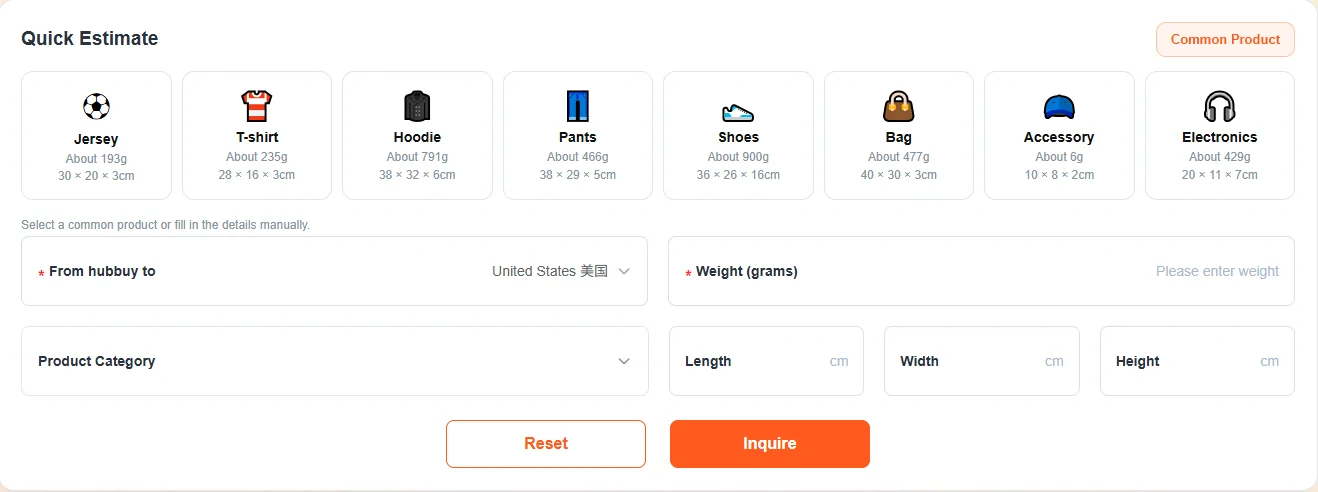
The panel offers a shortcut and a long way round. The shortcut is eight preset tiles: jersey, T-shirt, hoodie, pants, shoes, bag, accessory and electronics, each carrying an approximate weight and a folded size. Tap one and the fields fill themselves.
The long way is typing a weight in grams plus length, width and height. Use it whenever the item is not obviously one of the eight, and use it for anything bulky, because volume is what the presets model worst.
Write the preset weights down before you leave this page. They are the operator's own reference figures for common garments, captured on 2026-09-23, and they become useful again further down this page.
Historical source screenshot

Historical source screenshot

The destination decides every number on the page
One control sits above everything else, and until it is set the rest of the page cannot produce a figure. It is worth noticing that the country list still prints the Chinese name of the country beside the English one, which is a small sign of how recently this interface was translated.
Set it first, every time.
Historical source screenshot

Why the warehouse would rather you waited
The agent is explicit about the economics of consolidation, and the banner at the top of the shipping cost page states the mechanism in one sentence: items shipped together cost less per item than items shipped separately.
That is why the storage period exists at all. The warehouse is not doing you a favour by holding your goods, it is making the shipping half of the business work. Which means the sensible pattern for a first order is to accumulate rather than to ship each purchase as it lands, and to know the storage clock before you start accumulating. That clock is on help and terms.
Historical source screenshot

Three caveats printed under the price
Directly beneath the shipping cost table sits a notice box with three lines in it, and all three are reasons the number you are looking at is not the number you will pay.
Oversized items attract a price increase, and the real figure only appears once the goods are physically in the warehouse. Different categories of goods are costed differently, again resolved after warehousing. And the displayed price excludes value-added services, which are the optional extras such as reinforced packing that you select yourself.
Read together, these three say something simple: every figure on the shipping pages is provisional until a real box is on a real scale. Treat them as a planning tool, not a quotation.
Historical source screenshot

Where the capacity table and the estimator disagree
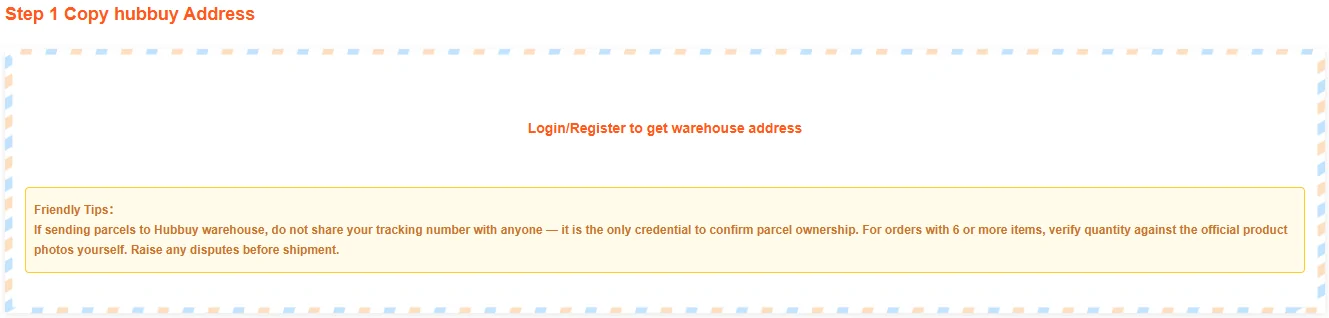
The capacity table is meant to make weight tangible. It pairs three weight tiers with a count of everyday items, so that five kilograms becomes fourteen hoodies, ten becomes twenty eight, and twenty becomes fifty six.
Do the division and those fourteen hoodies weigh about three hundred and fifty seven grams each. The estimator higher up this page, on the same site and on the same day, puts a hoodie at about seven hundred and ninety one grams. The two official figures are more than a factor of two apart, and the capacity counts double exactly in step with the weight tiers, which is what a straight arithmetic illustration looks like rather than a measurement.
So use the capacity table to picture a parcel and nothing more. When it matters, use the estimator, and weigh the real thing when you own it. Both figures were captured on 2026-09-23 and either could be corrected without anybody announcing it.
One more thing to notice on that table: the cost column carries no figure at all until a destination is chosen. That is honest interface design, and it is also the reason this site quotes no shipping prices.
Historical source screenshot

Historical source screenshot
What the inspection is actually looking at
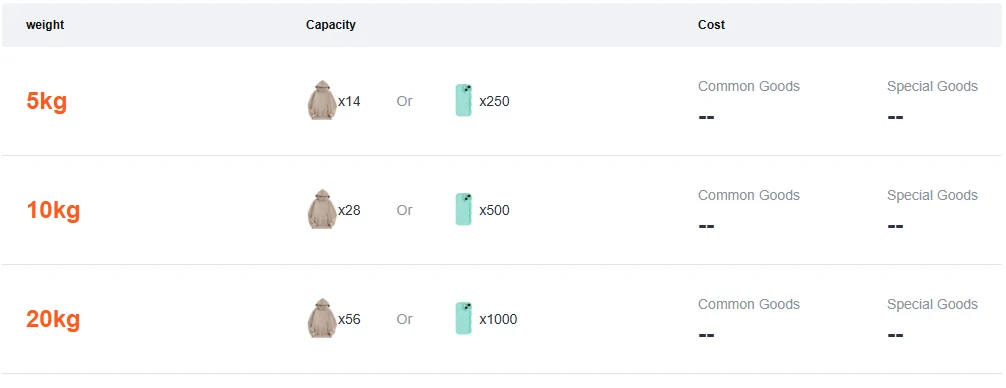
Free inspection photographs are the headline benefit of every agent in this market, and the official rules are much narrower than the marketing. Worth reading in full before you rely on them.
Inspection is not available at all for goods that arrive in sealed packaging or with sealing strips, nor for anything that is not a garment, bag, suitcase or shoe. For household appliances, digital products and other electronics, the inspection explicitly excludes authenticity, function and quality. In other words the photographs tell you what turned up and what it looks like. They are not a test.
Which makes reading the QC photographs, to borrow the name buyers have given them, a short exercise rather than a forensic one. Check the colour, the size marking, the quantity, obvious damage and obviously wrong construction, and nothing else. Do not expect them to answer questions about materials, electronics or origin, and raise anything you see before the parcel ships rather than after. That name has no official standing, which is covered on help and terms; the rules that do are at the inspection rules.
Historical source screenshot
The checks that only exist on the forwarding path
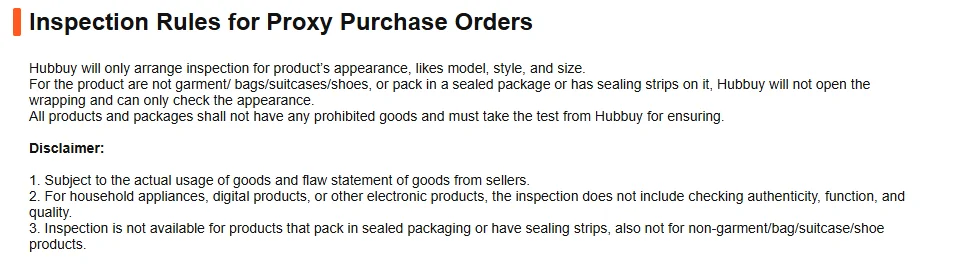
If you are forwarding rather than buying, two extra checks belong to you and nobody else, and both appear in the tips box on step one.
The first is the warehouse address itself, which is behind a login. Get it from your own account each time rather than from a forum post or an old screenshot; warehouse addresses move, and a parcel sent to a retired one is a parcel nobody is expecting. The tips box also tells you not to share your tracking number with anybody, for the reason given on what you type: it is the credential that proves the box is yours.
The second is counting. For larger orders the operator asks you to verify the quantity yourself against the official product photographs, and to raise any dispute before the parcel ships. After it ships, the parcel is in transit and the seller is out of reach.
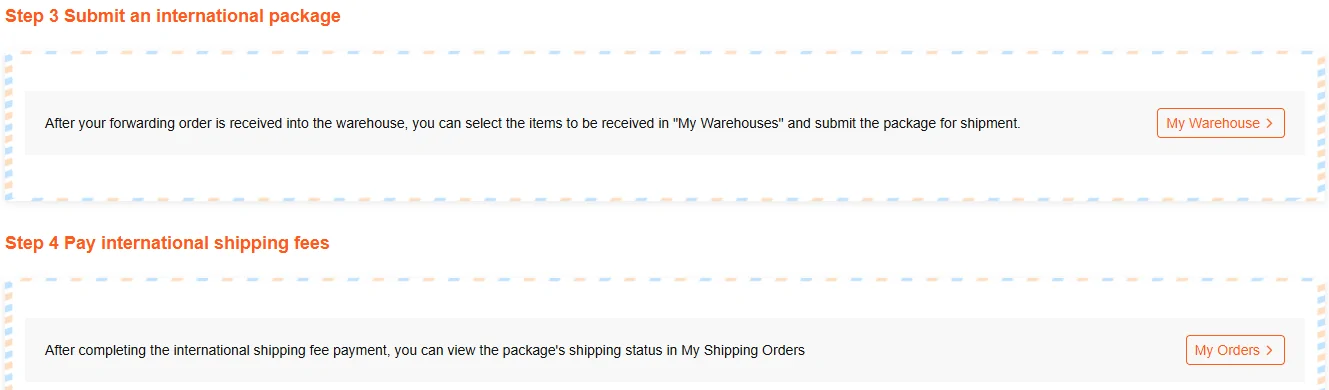
Steps three and four are the closing pair: select what goes in the box from your warehouse, then pay the international leg and watch the status. Nothing moves until you do the first of those.
Historical source screenshot
Historical source screenshot
Counting, in the operator's own words
The instruction below is the only place on the agent site where a check is handed to the customer explicitly, and it is buried in a tips box on a step most people scroll past.
Note what it asks you to compare against: the official product photographs, not your memory of the listing.
For orders with 6 or more items, verify quantity against the official product photos yourself.
Official forwarding page, captured 2026-09-23. Full page: the forwarding page.